What is Memori?
Memori is a memory layer for LLM applications, agents, and copilots. It continuously captures interactions, extracts structured knowledge, and intelligently ranks, decays, and retrieves the relevant memories. So your AI remembers the right things at the right time across every session.
Memori uses Advanced Augmentation to turn raw conversations into structured, searchable memories.
By capturing tool calls, decisions, workflow steps, outcomes, and other trace events, Agent Trace & Execution turns raw execution history into structured memory primitives that agents can recall and reuse across sessions. This allows agents to remember not only what users said, but what actually happened: which tools were used, which paths succeeded or failed, what preferences emerged through action, and what context should shape future decisions.
It runs asynchronously in the background to minimize impact on your response path.
Why Memori BYODB?
Database Freedom
Use CockroachDB, MariaDB, MongoDB, MySQL, OceanBase, Oracle, PostgreSQL, SQLite, or TiDB. Managed providers like AWS RDS/Aurora, Neon, and Supabase are also supported through their compatible engines.
Full Data Ownership
Your data stays in your database, on your infrastructure. Full compliance and regulatory control with no third-party storage.
LLM Provider Support
OpenAI, Anthropic, Gemini, and Grok (xAI) via direct SDK wrappers. Bedrock is
supported via LangChain ChatBedrock. OpenAI-compatible providers (Nebius,
Deepseek, NVIDIA NIM, Azure OpenAI, and more) work through OpenAI's base_url
parameter. Supports sync, async, streamed, and unstreamed modes, plus LangChain
, Agno, and Pydantic AI.
Intelligent Recall
Intelligent Recall surfaces the right memories at the right time. Memories are ranked by relevance and importance, with intelligent decay so older or less relevant facts recede — so your AI stays contextually aware without clutter. Recall any memory later with semantic search; use manual recall for custom prompts, UIs, or debugging. See How Memori Works for automatic vs manual recall and tuning.
Quick Example
Get started with a database connection and your favorite LLM:
- One-line setup — Connect your DB and LLM; memory capture, augmentation, and recall work without extra config.
- Semantic recall — Queries like “what does this user prefer?” pull the right memories automatically.
- Dashboard — Use app.memorilabs.ai for API keys, usage, and (with Memori Cloud) the Graph Explorer and Playground.
- Your data, your rules — Store everything in your DB; compliance, backups, and custom analytics stay under your control.
- Roadmap — Support for Hermes Agent BYODB Implementation; Support for OpenClaw BYODB Implementation; Turbo-charging Advanced Augmentation; Exciting optimizations to Agent-Native Recall
import os
import sqlite3
from memori import Memori
from openai import OpenAI

# Requires OPENAI_API_KEY in your environment
def get_sqlite_connection():
    return sqlite3.connect("memori.db")

client = OpenAI(api_key=os.getenv("OPENAI_API_KEY"))
mem = Memori(conn=get_sqlite_connection).llm.register(client)

# Track conversations by user and process
mem.config.storage.build()
mem.attribution(entity_id="user_123", process_id="support_agent")

# All conversations automatically persisted and recalled
response = client.chat.completions.create(
    model="gpt-4.1-mini",
    messages=[{"role": "user", "content": "My favorite color is blue."}]
)
OpenAI-Compatible Providers
Memori supports any model that uses OpenAI's client interface via the base_url parameter — including Nebius, Deepseek, NVIDIA NIM, and more.
import os
import sqlite3
from memori import Memori
from openai import OpenAI

def get_sqlite_connection():
    return sqlite3.connect("memori.db")

client = OpenAI(
    base_url="https://api.studio.nebius.com/v1/",
    api_key=os.getenv("NEBIUS_API_KEY"),
)

mem = Memori(conn=get_sqlite_connection).llm.register(client)
Core Concepts
| Concept | Description | Example |
|---|---|---|
| Entity | Person, place, or thing (like a user) | entity_id="user_123" |
| Process | Your agent, LLM interaction, or program | process_id="support_agent" |
| Session | Groups LLM interactions together | Auto-generated UUID, manually manageable |
| Augmentation | Background AI enhancement of memories | Auto-runs after wrapped LLM calls |
| Recall | Retrieve relevant memories from previous interactions | Auto-injects recalled memories |
Architecture Overview
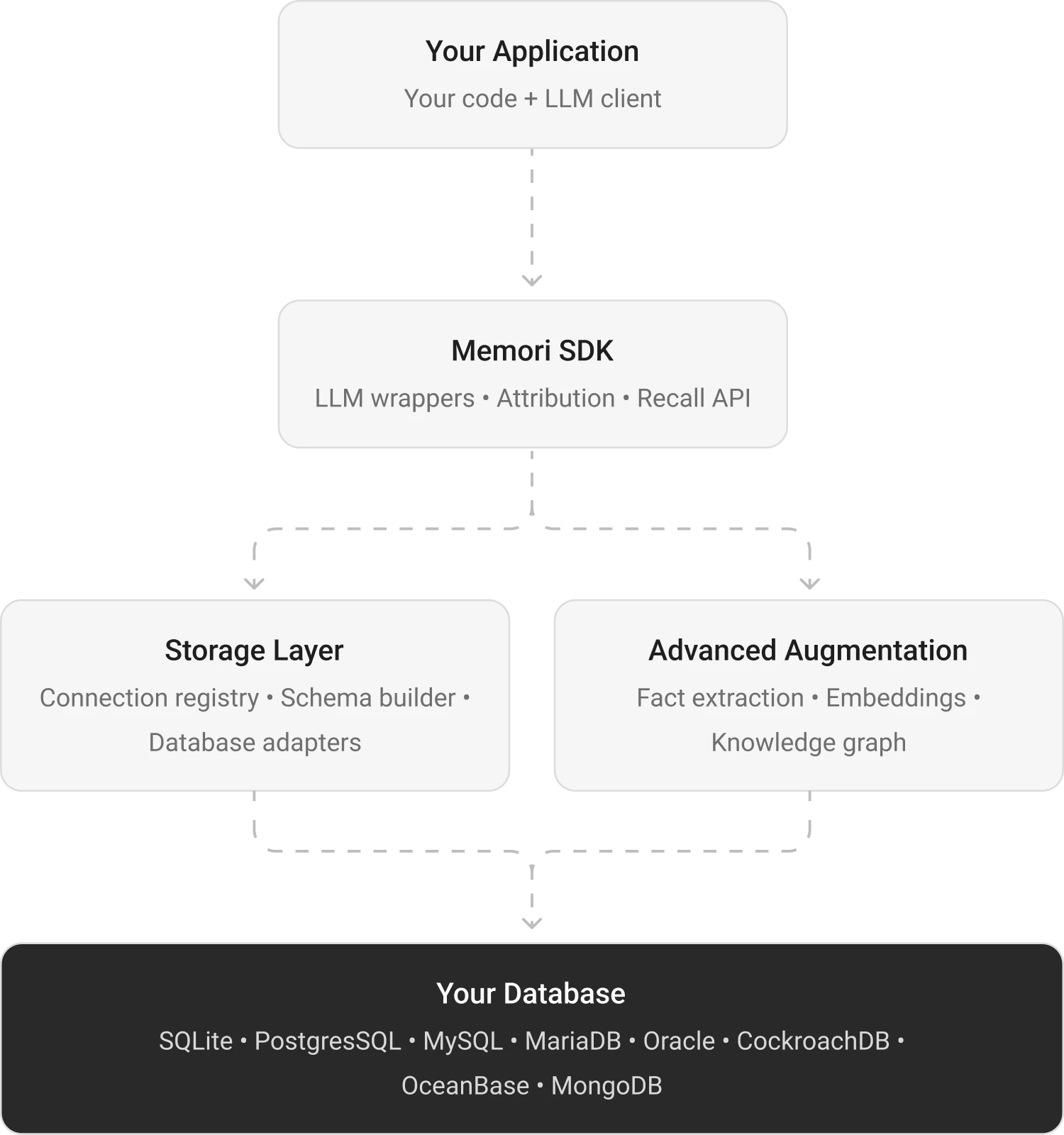
The diagram has three lanes: your app, the Memori SDK, and your own database. Your app calls the LLM normally, Memori intercepts the call, and the synchronous response path continues with zero added latency.
Synchronous capture: conversation messages are stored in memori_conversation_message while your normal LLM flow continues.
Recall injection: relevant memories are pulled from memori_entity_fact and injected into later prompts.
Async augmentation: background processing extracts facts, preferences, rules, events, and relationships from conversations.
Own-your-data storage: structured memory records are written to your database, including memori_entity_fact, memori_process_attribute, and memori_knowledge_graph.